Attackers Used ConnectWise Cloud Backup App Identities to Get Into Microsoft 365 Tenants
Attackers abused application identities from ConnectWise Cloud Backup, formerly SkyKick, to sign in to customer Microsoft 365 tenants. ConnectWise has suspended the service. MSPs need to disable the apps in every tenant and hunt for added credentials.
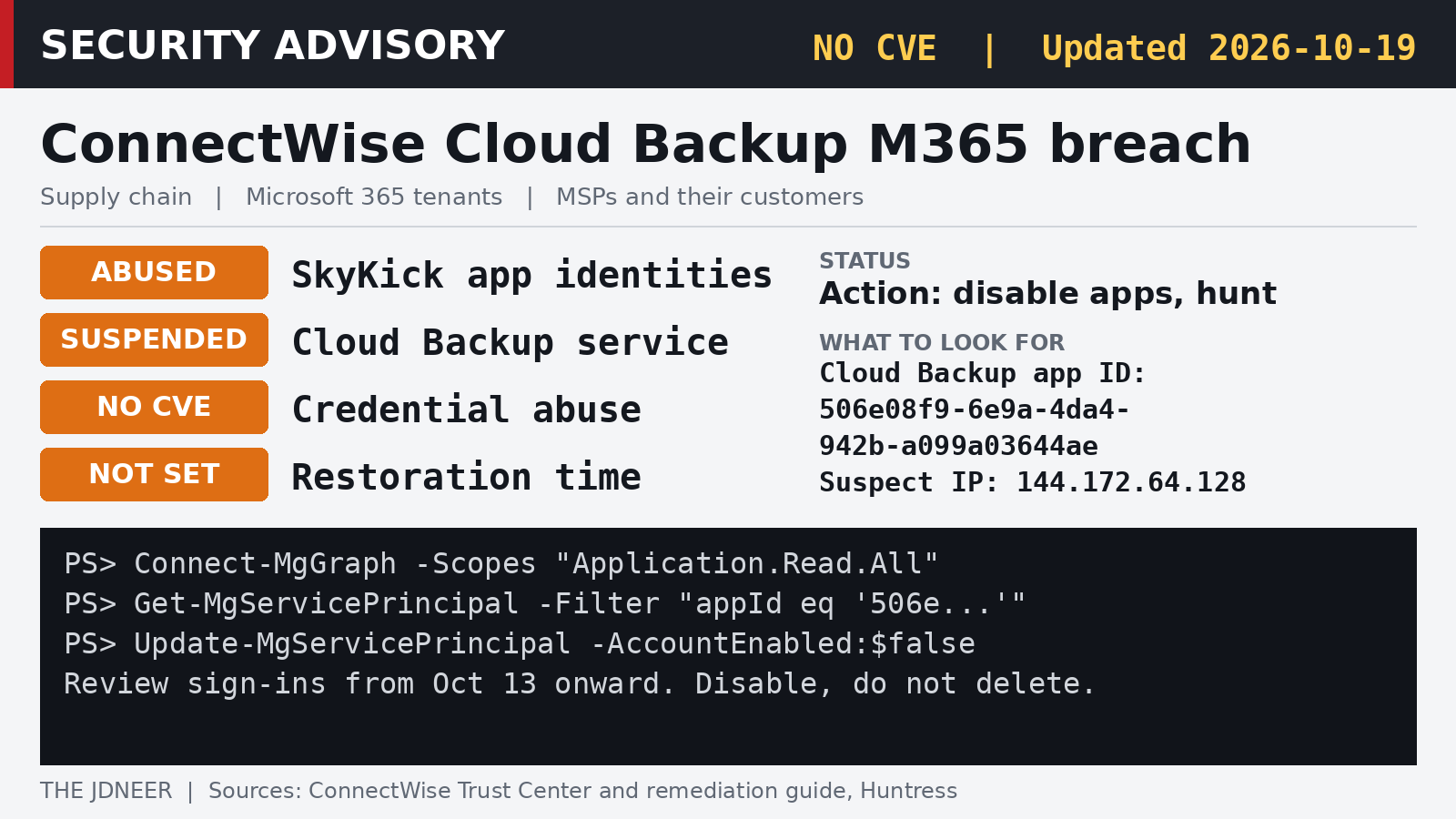
A backup service is trusted with nearly everything in a Microsoft 365 tenant: mail, files and Teams chats. That trust is what attackers turned against managed service providers and their customers this past week. ConnectWise says it "identified unauthorized access to application identities" tied to ConnectWise Cloud Backup, the service formerly known as SkyKick, and has suspended it while it investigates, according to its Trust Center advisory.
As of the advisory's latest update on October 20 (00:45 UTC, 8:45 AM Manila), Cloud Backup, SaaS Security and Cloud Management remain suspended, and scheduled backups, archive access and restores are still unavailable. ConnectWise says it is resetting accounts and replacing application credentials in the affected environment, plans to restore services "in controlled phases," and will give partners "clear instructions" before anything is re-enabled. There is no restoration date yet; the company says it "will share restoration timing as soon as it is confirmed." It also says that since mitigations began on October 17 at 05:00 UTC, it has "not observed successful threat activity in the environments we monitor," though that "does not establish whether individual partner or customer Microsoft 365 tenants have been affected."
What happened
Huntress, which first raised the alarm on October 16, said in its analysis that a Microsoft 365 credential (an API secret) belonging to ConnectWise Cloud Backup had been compromised and was being used to access customers' Microsoft 365 environments. Because these sign-ins happen as an application, not as a user, multi-factor authentication does not come into play; the attacker inherits whatever permissions the customer already granted the backup app.
According to Huntress, the backup app's identity signed in to customer tenants from 144.172.64[.]128, a hosting provider address, on October 15 between 06:13 and 08:34 UTC and received Microsoft Graph tokens, moving through tenants a few seconds apart in a way that "points to a script working from a target list." Legitimate traffic from the app comes from Azure private IP space. As of 19:00 UTC on October 16, Huntress said it had confirmed unauthorized sign-ins in 162 tenants. In an October 17 update, it added that almost 1,000 Entra tenants showed sign-in activity from that address, with over 300 succeeding, although sign-ins failed to gain access where the ConnectWise service principal was not present.
A second ConnectWise app was involved too. Huntress saw Cloud Management service principals assign themselves directory roles, mostly Exchange Administrator, in roughly 50 tenants it monitors. In one customer tenant, ConnectWise Cloud Management - MS Teams (application ID 24205314-2b89-4e07-a2a4-579e898a5640) added itself to the Global Administrator role at 03:44 UTC on October 15 and then added new client secrets to two other applications, an MSP management app and Huntress's own app. In an October 19 update, Huntress reported the same pattern in a second tenant: the application granted itself Global Administrator, then planted a new secret on a small number of other applications, with the activity in both tenants taking place within two minutes of each other around 03:45 UTC on October 15. In the two tenants it reviewed, Huntress says it "found no evidence of mailbox or file manipulation, or user or policy changes," though it cautions that the access may have been used for Microsoft Graph directory reads, which leave no audit record. That happened about two and a half hours before the first sign-ins from 144.172.64[.]128, and Huntress says it has not tied the two phases to the same operator. It advises disabling both the Cloud Backup app and the MS Teams app immediately, and considering the other Cloud Management IDs as well.
ConnectWise says it disabled seven application identities and revoked their credentials at 07:00 UTC on October 17, per its technical investigation and remediation guide. The same guide warns that those vendor-side actions "do not change the configuration of enterprise applications within individual partner or customer tenants," and that "previously issued tokens may remain usable until they expire." On the backups themselves, ConnectWise's October 18 update (01:00 UTC) says existing archives "remain encrypted, isolated, and preserved" and that it has "no evidence that these archives have been accessed." Its October 20 update again describes the archives as encrypted, isolated and preserved, "with no indication that they have been compromised." The company adds that this finding covers stored backup archives and does not establish whether any individual live Microsoft 365 environment was affected.
Are you affected?
If you, your MSP or any customer tenant you manage ever connected SkyKick or ConnectWise Cloud Backup or Cloud Management, assume you need to check, even if the connection has been dormant for years. ConnectWise's guide lists these application IDs; match on the ID, not the display name:
| Application | Application ID |
|---|---|
| Cloud Backup | 506e08f9-6e9a-4da4-942b-a099a03644ae |
| Cloud Management | 2399d300-6fca-4e6a-a686-399fefe75b83 |
| CM - MS Teams | 24205314-2b89-4e07-a2a4-579e898a5640 |
| CM - Exchange Online | b78f6a77-d4e5-46fb-87e5-d1648bd02519 |
| CM - MS Graph | 0de14c77-b9b0-4137-9360-34878a929827 |
| CM - Partner Center | 412dcf96-176d-4b3a-a1b0-4981ad66971e |
| CM - SharePoint Online | b2b55f5b-7758-4719-8d8f-88ae172e6bdb |
- Preserve logs first, or in parallel. Export Entra audit logs and all sign-in categories (interactive, non-interactive, service principal, managed identity) as JSON, plus Microsoft Purview audit data. ConnectWise notes Entra keeps these for only 7 days on Free and 30 days on P1/P2.
- Review sign-ins from October 13 onward. Filter every sign-in category on the IP
144.172.64.128, which ConnectWise lists alongside144.172.64[.]99and144.172.64[.]60, and filter service principal sign-ins on each application ID. - Look for persistence. In audit logs, check ApplicationManagement events (new credentials, owners, app role assignments, consent), RoleManagement changes, Conditional Access changes and new users. Huntress stresses that disabling the apps "will not remove credentials that were already added," so review credentials on all of your applications, not just ConnectWise's.
- Keep the apps off. Do not re-enable them until ConnectWise gives formal restoration instructions.
Check for unexpected admin roles. Huntress advises checking Entra audit logs for ConnectWise or SkyKick applications adding themselves to a directory role, which appears as an "Add member to role" event, and removing any role you did not intentionally grant, especially Global Administrator or Privileged Authentication Administrator, once the app is disabled. Separately, it advises auditing all service principal sign-ins to the affected apps from around 01:00 UTC on October 15 to 02:00 UTC on October 16. With Microsoft Graph PowerShell:
Connect-MgGraph -Scopes "AuditLog.Read.All"
$f = "activityDisplayName eq 'Add member to role'" +
  " and activityDateTime ge 2026-10-13T00:00:00Z"
Get-MgAuditLogDirectoryAudit -All -Filter $f |
  Select-Object ActivityDateTime, Result,
    @{n='By';e={$_.InitiatedBy.App.DisplayName}},
    @{n='Target';e={$_.TargetResources[0].DisplayName}}
An application, not a person, showing up as the initiator is the pattern to chase.
Find the apps and disable them, do not delete them. In the Entra admin center, go to Enterprise applications, All applications, open each ID, and set "Enabled for users to sign-in?" to No. With Microsoft Graph PowerShell, the check for one ID looks like this:
Connect-MgGraph -Scopes "Application.ReadWrite.All"
$sp = Get-MgServicePrincipal `
  -Filter "appId eq '506e08f9-6e9a-4da4-942b-a099a03644ae'"
$sp | Select-Object DisplayName, AccountEnabled, Id
Update-MgServicePrincipal -ServicePrincipalId $sp.Id `
  -AccountEnabled:$false
Repeat for each ID in the table. ConnectWise and Huntress both say to disable rather than delete, so configuration and evidence are preserved.
For MSPs, the uncomfortable lesson is one that management-plane attacks keep teaching: the tools that manage many customers at once are the most valuable keys you hold. Inventory the third-party apps with standing permissions in every tenant, and remove the ones nobody uses anymore.