frigate-top v1.0.0: htop for Your Frigate NVR
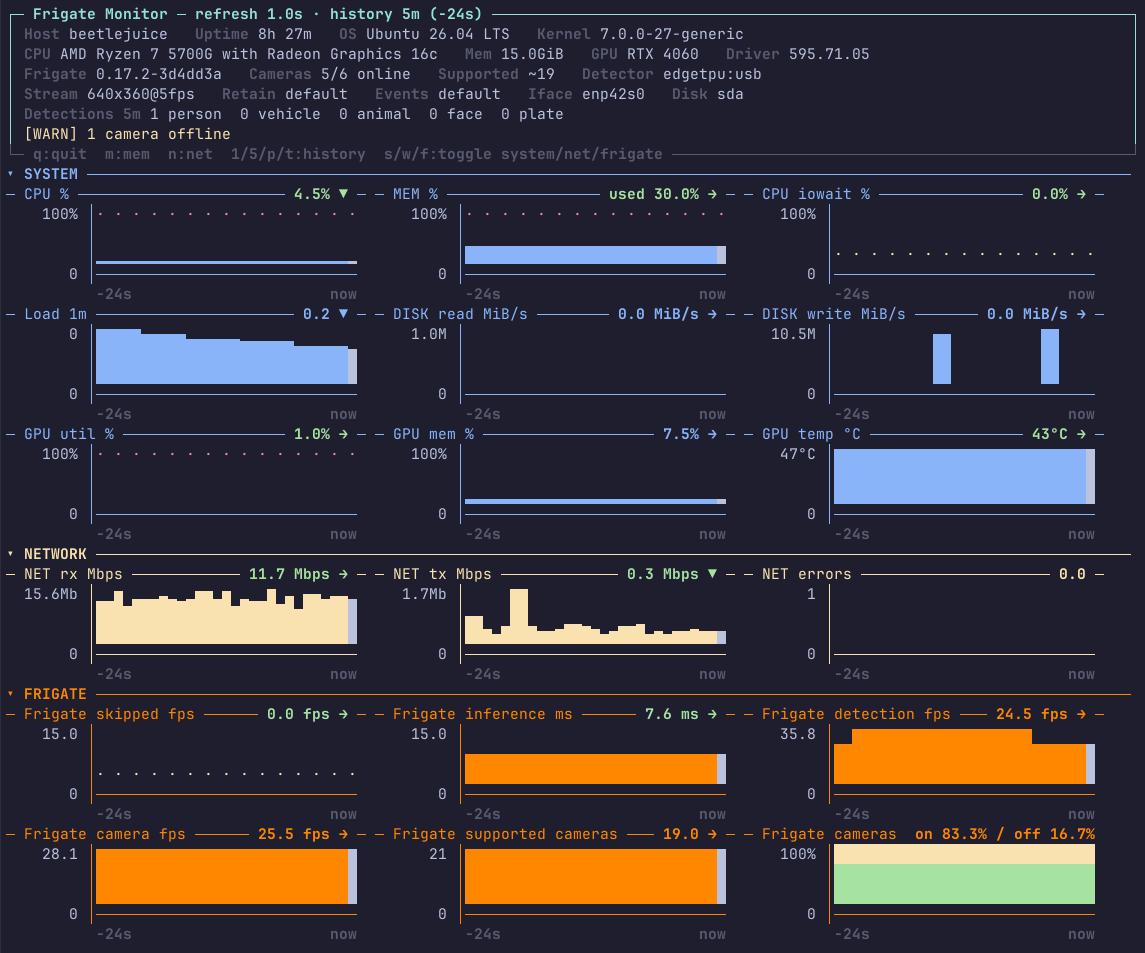
I've released frigate-top v1.0.0, an htop-style terminal dashboard for Frigate NVR hosts. It shows CPU, memory, I/O wait, disk, NVIDIA GPU, and network errors alongside skipped frames, detector inference time, camera status, recent detections, and an estimated camera capacity.

frigate-top v1.0.0: htop for Your Frigate NVR
I have released frigate-top v1.0.0, a real-time, interactive terminal dashboard for Frigate NVR hosts.
For those unfamiliar with it, Frigate is an open-source network video recorder built around real-time AI object detection for IP cameras. Video processing and object detection run locally on your own hardware rather than depending on a cloud service. Frigate can use CPUs, GPUs, and dedicated AI accelerators to process camera streams, identify tracked objects, and integrate with platforms such as Home Assistant.
The official Frigate website, documentation, and upstream project are available here:
The simplest description of frigate-top is htop for your Frigate box.
Frigate provides a solid interface for cameras, events, recordings, and object detection, but diagnosing the host itself often requires jumping between several tools. CPU load may look fine while I/O wait is climbing. A detector may still be running while inference latency is getting worse. Cameras may remain connected while frames are being skipped. Storage, network errors, GPU load, and Frigate statistics all need to be considered together.
frigate-top puts those signals into one terminal view.

One dashboard for the host and Frigate
The interface is divided into three groups: SYSTEM, NETWORK, and FRIGATE.
The system section covers CPU usage, memory pressure, CPU I/O wait, one-minute load, disk reads and writes, and NVIDIA GPU utilization, memory use, and temperature. Multiple NVIDIA GPUs are detected and displayed separately.
The network section shows receive and transmit throughput together with interface errors and dropped packets. Non-zero network errors are highlighted immediately because they should not be treated as normal background noise.
The Frigate section includes:
- skipped frames
- detector inference time
- detection FPS
- aggregate camera FPS
- online and offline camera counts
- recent tracked-object activity
- an estimated detector-supported camera count
The detections summary is pulled from Frigate's /api/events endpoint and breaks recent activity down into people, vehicles, animals, recognised faces, recognised plates, and other tracked objects.
Detector capacity at a glance
One of the more useful fields is the supported cameras estimate.
This is calculated from detector throughput, the configured detection frame rate, and a configurable safety margin. It avoids using the live detection rate, which changes with motion and would make the result misleading.
The estimate is not a promise that every possible camera configuration will work, but it provides a useful capacity indicator while tuning or expanding a Frigate system.
The safety margin can be adjusted with --detector-headroom. The default is 0.75, meaning the estimate reserves 25 percent of the detector's calculated throughput instead of sizing directly against the theoretical limit.
Designed to be easy to deploy
frigate-top is a single Python module and has no required third-party dependencies. It runs on Linux with Python 3.7 or newer and reads most host statistics directly from /proc and /sys.
Optional integrations are detected at runtime:
nvidia-smiprovides NVIDIA GPU telemetry- Docker or Podman provides Frigate container status
- PyYAML provides richer Frigate configuration parsing
- the Frigate API provides camera, detector, and event statistics
Without PyYAML, the tool uses a minimal fallback parser for the configuration values it needs.
It can automatically locate Frigate on common HTTP and HTTPS ports, select the busiest network interface, identify the active disk device, and discover all available NVIDIA GPUs. Explicit overrides are available for installations where auto-detection is not appropriate.
Installation
The easiest way to deploy it locally is to fetch the release file and place it on your system path:
sudo curl -fsSL https://git.jdneer.com/jd/frigate-top/raw/tag/v1.0.0/frigate_top.py \
  -o /usr/local/bin/frigate-top

sudo chmod +x /usr/local/bin/frigate-top

frigate-top
See the installation documentation for additional installation options.
Basic usage
Start the dashboard with a one-minute history and one-second refresh interval:
frigate-top
Use a longer history window:
frigate-top --timeframe 10
Specify the Frigate API and configuration file explicitly:
frigate-top \
  --frigate-url http://localhost:5000 \
  --config /config/config.yml
Pin the network interface and disk device:
frigate-top --net-iface eth0 --disk nvme0n1
Export collected samples to CSV:
frigate-top --csv /tmp/frigate-top.csv
Generate a one-off, non-interactive reading for scripts, cron jobs, or health checks:
frigate-top --snapshot
The default renderer uses terminal block characters. Dense Braille graphs and plain ASCII output are also available:
frigate-top --braille
frigate-top --ascii --no-color
Interactive controls
While the dashboard is running, the history window can be changed with 1, 5, p, or t for one minute, five minutes, fifteen minutes, or a custom duration.
The s, w, and f keys collapse or expand the System, Network, and Frigate sections. Memory can be switched between percentage and byte views with m, while network units can be toggled between Mbps and MB/s with n.
Press q to exit.
Operational and security choices
The tool is read-only. Subprocess calls use fixed argument lists without invoking a shell, YAML is parsed with safe_load, and optional debug logs are created in a per-user runtime directory with protection against symbolic-link replacement.
TLS certificates are verified when connecting to remote HTTPS Frigate instances. Verification is relaxed automatically only for loopback connections, where self-signed certificates are common, or explicitly with --insecure.
Source, licence, and feedback
The source code, documentation, release notes, and issue tracker for frigate-top are available here:
frigate-top is released under the Apache License 2.0. Bug reports, compatibility feedback, and sensible feature requests are welcome through the frigate-top issue tracker.
For questions about installing, configuring, or troubleshooting Frigate itself, refer to the upstream resources:
This is the initial public release. The immediate goal was a useful, low-dependency operational view that can be copied onto a Frigate host and run without deploying another monitoring platform.
frigate-top is an independent project and is not affiliated with or endorsed by the Frigate NVR project, NVIDIA, Google, or Docker.