Attackers Are Exploiting a SiteGuard WAF Bug to Run Commands as Root or SYSTEM
A command injection flaw in SiteGuard Server Edition's statistics feature, on by default, is being exploited to run commands as root or SYSTEM. EG Secure Solutions has fixes and a patch. Save diagnostic data before you update, or attack traces may be lost.
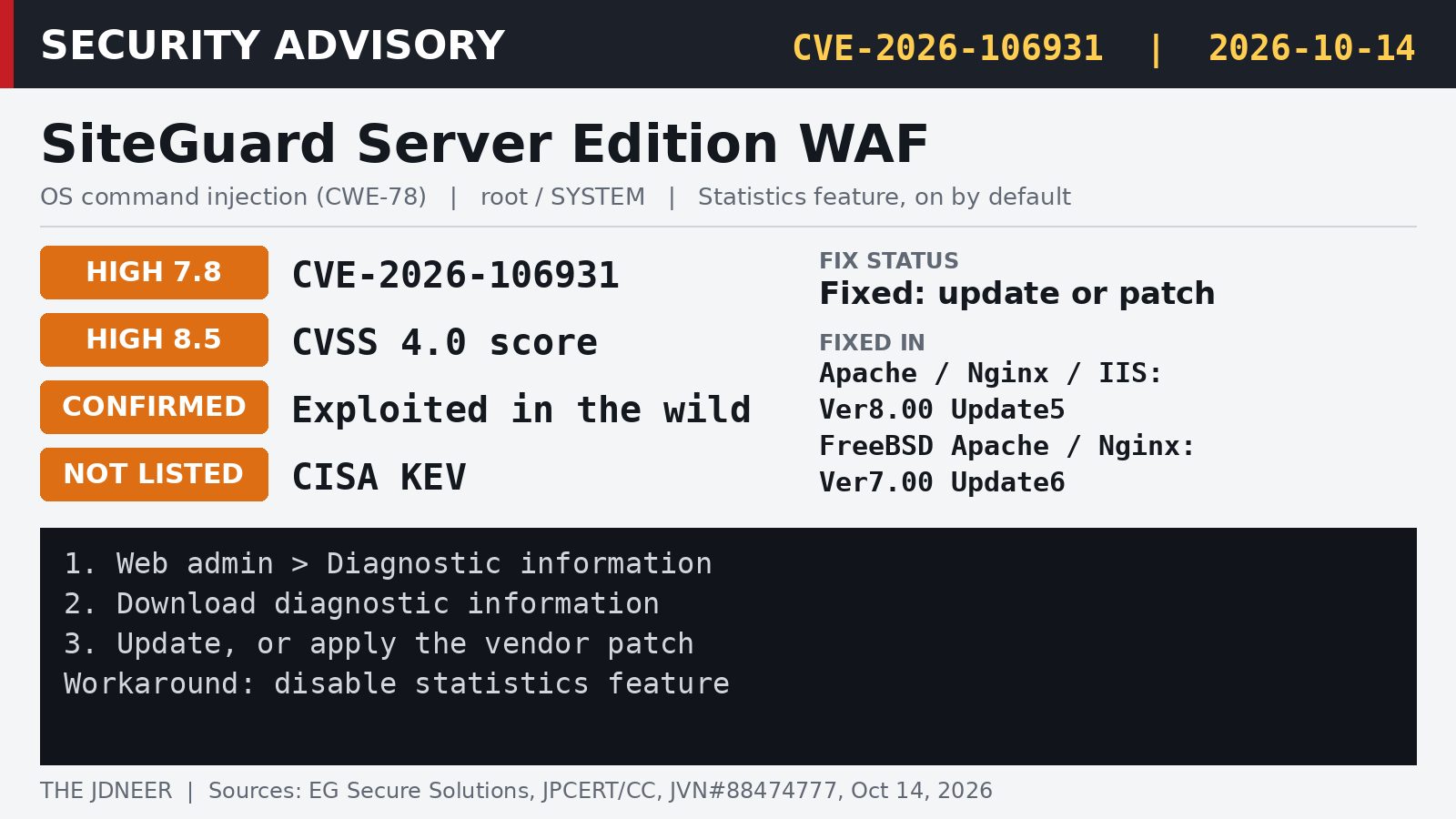
A web application firewall is supposed to be the thing standing between attackers and a web server. For some SiteGuard users in Japan, it has become the way in. EG Secure Solutions, the Tokyo company behind SiteGuard, disclosed on October 14 that an OS command injection vulnerability in SiteGuard Server Edition, tracked as CVE-2026-106931, is already being exploited, according to its advisory (in Japanese).
The flaw sits in the product's statistics feature, which is enabled by default. Successful exploitation can let an attacker "execute arbitrary OS commands with root or SYSTEM privileges on the system running the affected product," according to the JVN advisory coordinated by JPCERT/CC. JPCERT/CC issued its own alert (JPCERT-AT-2026-0032, in Japanese) the same day, saying it has confirmed the product is widely used in Japan and urging users to apply fixes and check for compromise.
SiteGuard Server Edition is a host-based WAF that plugs into the web server itself, on Apache httpd, Nginx and IIS. It is a different product from the SiteGuard WP Plugin for WordPress, which the advisories do not mention.
How serious is it?
The vendor and JVN both label the issue critical, and it is confirmed exploited in the wild. The CVSS scores are lower than that label suggests: 8.5 under CVSS 4.0 and 7.8 under CVSS 3.0, both rated High. The vectors (AV:L/PR:L) score it as a local attack that needs low privileges, so it is best read as a path from limited access to full control of the server. Neither advisory explains how attackers are reaching it, who is behind the attacks, or how many sites were hit.
EG Secure Solutions says it privately notified customers with direct support contracts on September 29, about two weeks before public disclosure. As of the CISA catalog dated October 16, CVE-2026-106931 was not listed in the Known Exploited Vulnerabilities catalog, so a missing KEV entry should not be read as a sign it is not being exploited.
| Edition | Affected | Fixed in |
|---|---|---|
| Apache, Nginx, IIS | Ver2.20 to before Ver8.00 Update5 | Ver8.00 Update5 |
| FreeBSD Apache, Nginx | Ver2.20 to before Ver7.00 Update6 | Ver7.00 Update6 |
IIS editions from Ver3.10 through Ver4.00 Update4 are not affected, per both the vendor and JVN. In every other affected version, the bug only applies when the statistics feature is on, which is the default.
Are you affected?
This checklist follows the vendor and JPCERT/CC guidance. The search commands below are simple ways to find SiteGuard on a server you are not sure about; they look for the product name in configs and loaded modules and are not an official vendor check.
- Check the version and the statistics setting in the SiteGuard web management screen. Anything from Ver2.20 up to the fixed releases in the table above, with statistics enabled, is affected.
- Preserve evidence first. The vendor warns that updating or patching may erase traces of an attack. Before you change anything, go to the web management screen, then Diagnostic information, then Download diagnostic information, and keep the file.
- Fix it. Update to Ver8.00 Update5 (Apache, Nginx, IIS) or Ver7.00 Update6 (FreeBSD). If you cannot upgrade, EG Secure Solutions offers a patch that replaces the files used for statistics processing, including for end-of-life versions.
- If you cannot patch yet, JPCERT/CC says disabling the statistics feature avoids the vulnerability. Follow the vendor's steps for doing so.
- Investigate. Because exploitation is confirmed and leads to root or SYSTEM, JPCERT/CC says users should consider checking for compromise, not just patching. Review web server and system logs for unexpected processes, new accounts or scheduled tasks around the time the server was exposed, and contact the vendor's support desk or JPCERT/CC if you find something.
Find it on IIS. From an elevated Command Prompt:
%windir%\system32\inetsrv\appcmd.exe list modules ^
  | findstr /i siteguard
Find SiteGuard on Linux web servers. Look for it in Apache or Nginx configuration and loaded modules:
sudo grep -rli siteguard /etc/httpd /etc/apache2 \
  /etc/nginx 2>/dev/null
apachectl -M 2>/dev/null | grep -i siteguard
Customers with a support contract should already have heard from EG Secure Solutions in late September. Anyone running SiteGuard Server Edition through a reseller or a hosting provider should check with them directly, since the vendor's support desk is reached through the contract or the reseller that delivered the product.