Building a Private Network on Hetzner Cloud Behind Your Own Firewall
Keep servers off the public internet: a Hetzner Cloud private network with one route, your own firewall as the gateway, and working configs for Ubuntu and Rocky Linux 8.
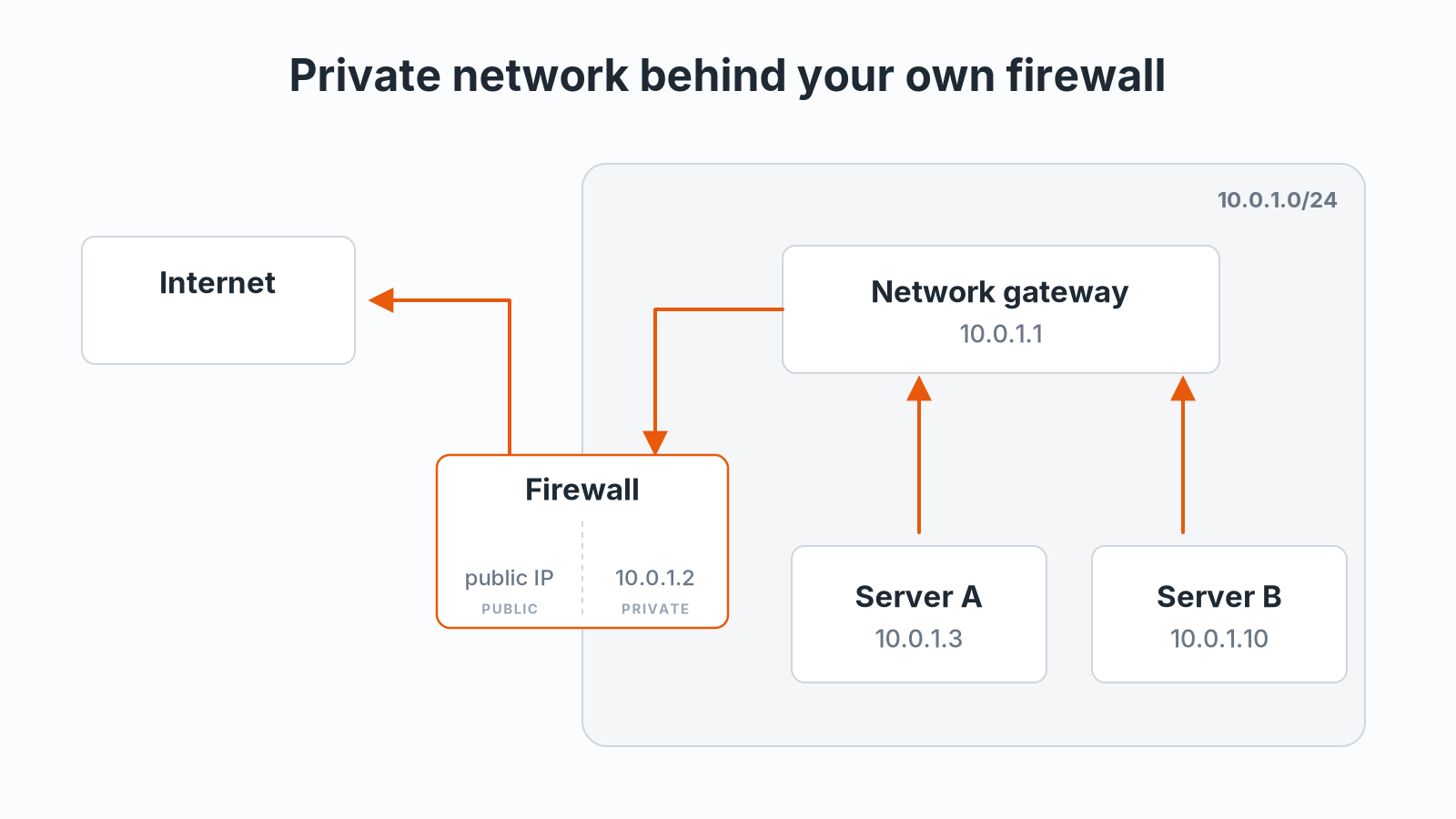
I like keeping servers off the public internet. On Hetzner Cloud that is easy: put them in a private network, give one server a public IP to act as the firewall, and send everything else through it. Here is how I set it up, following Hetzner's network architecture docs, the server configuration guide, and the NAT gateway tutorial.
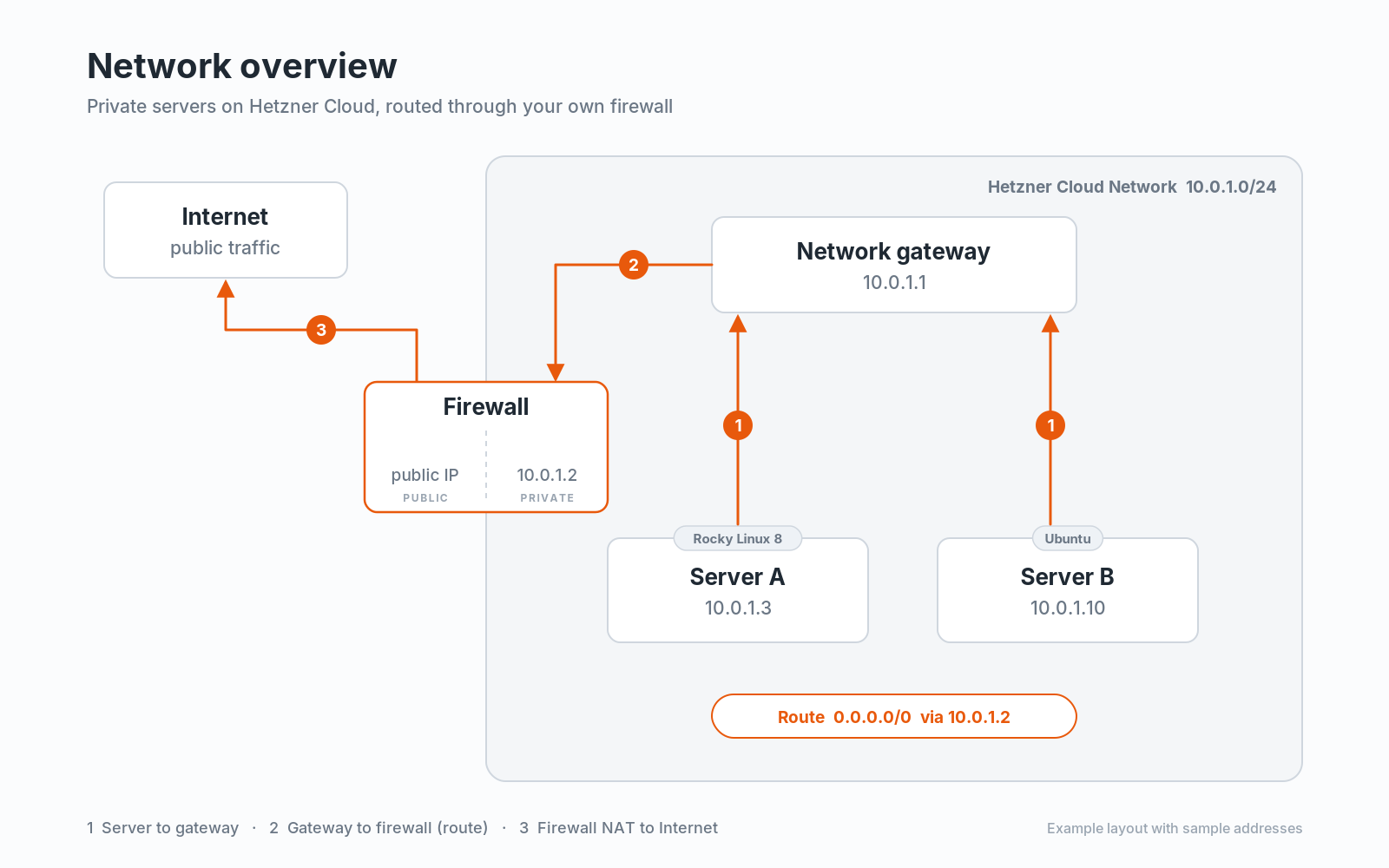
One thing to understand before you start: there is no layer 2 adjacency between hosts on a Hetzner Cloud private network. Cloud subnets work at layer 3, so every packet is routed through the network gateway 10.0.1.1, even between two servers in the same subnet. Server A never talks to Server B directly. Each server only resolves the gateway's MAC address via ARP, never another server's, and there is no broadcast traffic between hosts. That is why each server gets a /32 and an on-link route to the gateway. Hetzner explains this in its network architecture docs.
1. Create the network and subnet
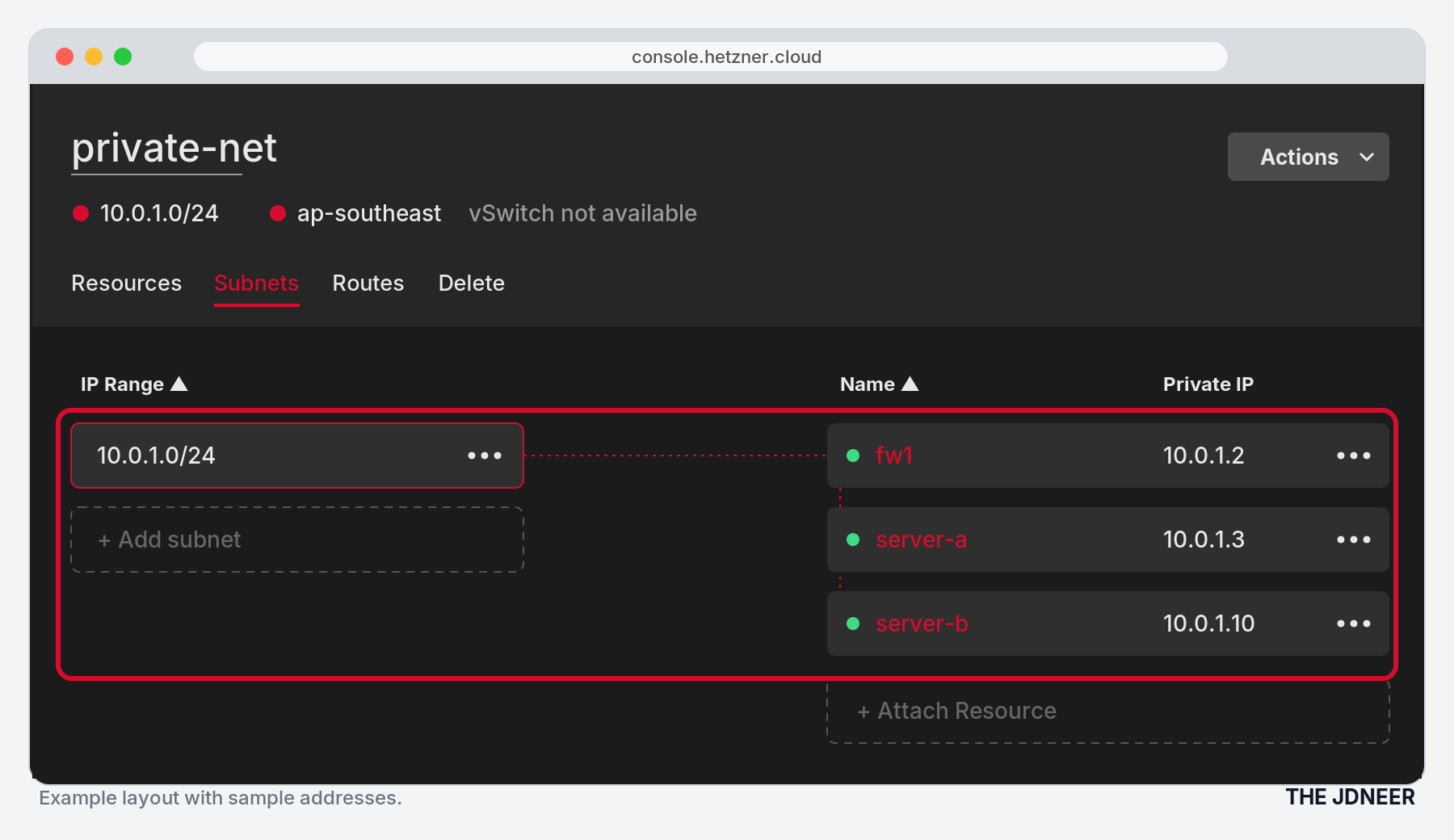
In the Hetzner Console, go to Networks and create a network. I use 10.0.1.0/24 and add one subnet with the same range in my network zone. Hetzner takes the first address, 10.0.1.1, as the network gateway. You cannot assign it to a server.
2. Attach the servers
Attach the firewall and every private server to the network. Each one gets a private IP, shown in the Console next to the server. In my example the firewall is 10.0.1.2, Server A (Rocky Linux 8) is 10.0.1.3, and Server B (Ubuntu) is 10.0.1.10. Hetzner notes that private connections only work with the IP the Console shows, so do not invent your own.
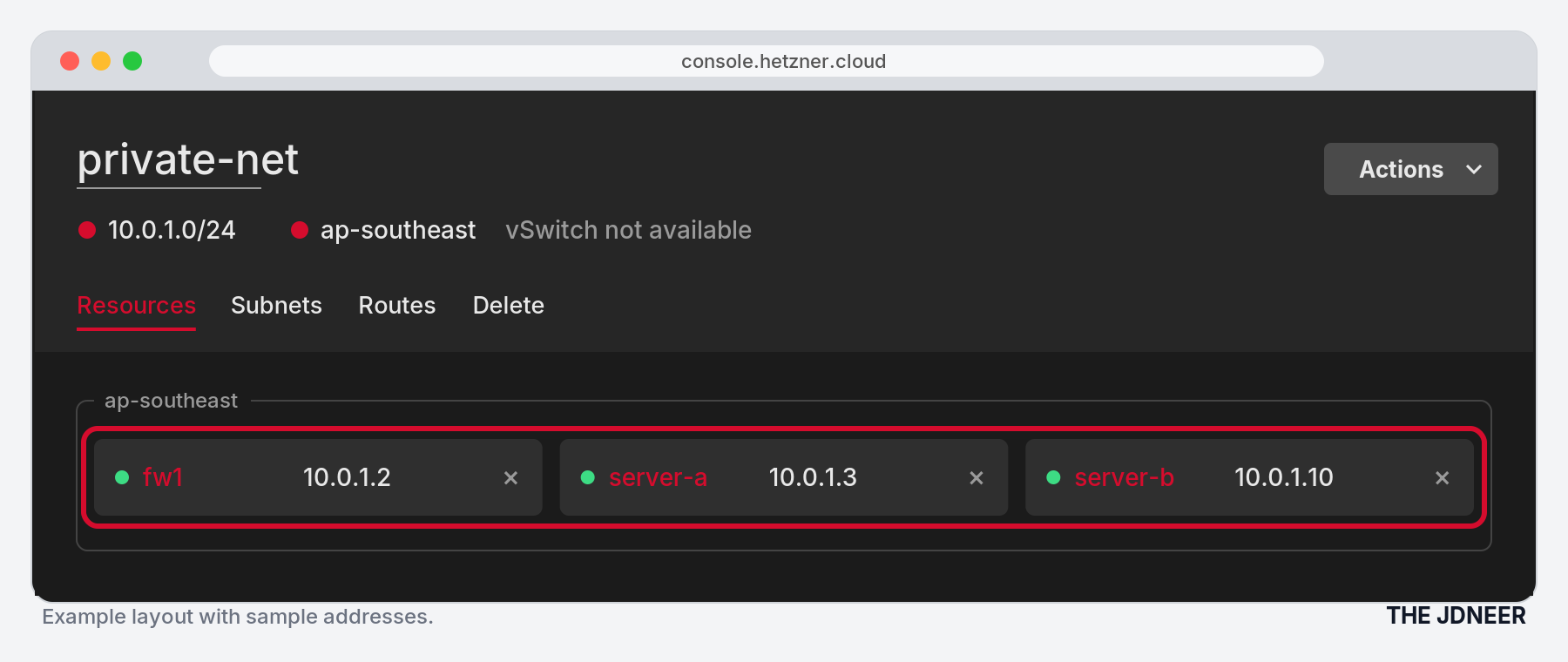
Give only the firewall a public IP. The other servers stay private-only.
3. Add the default route
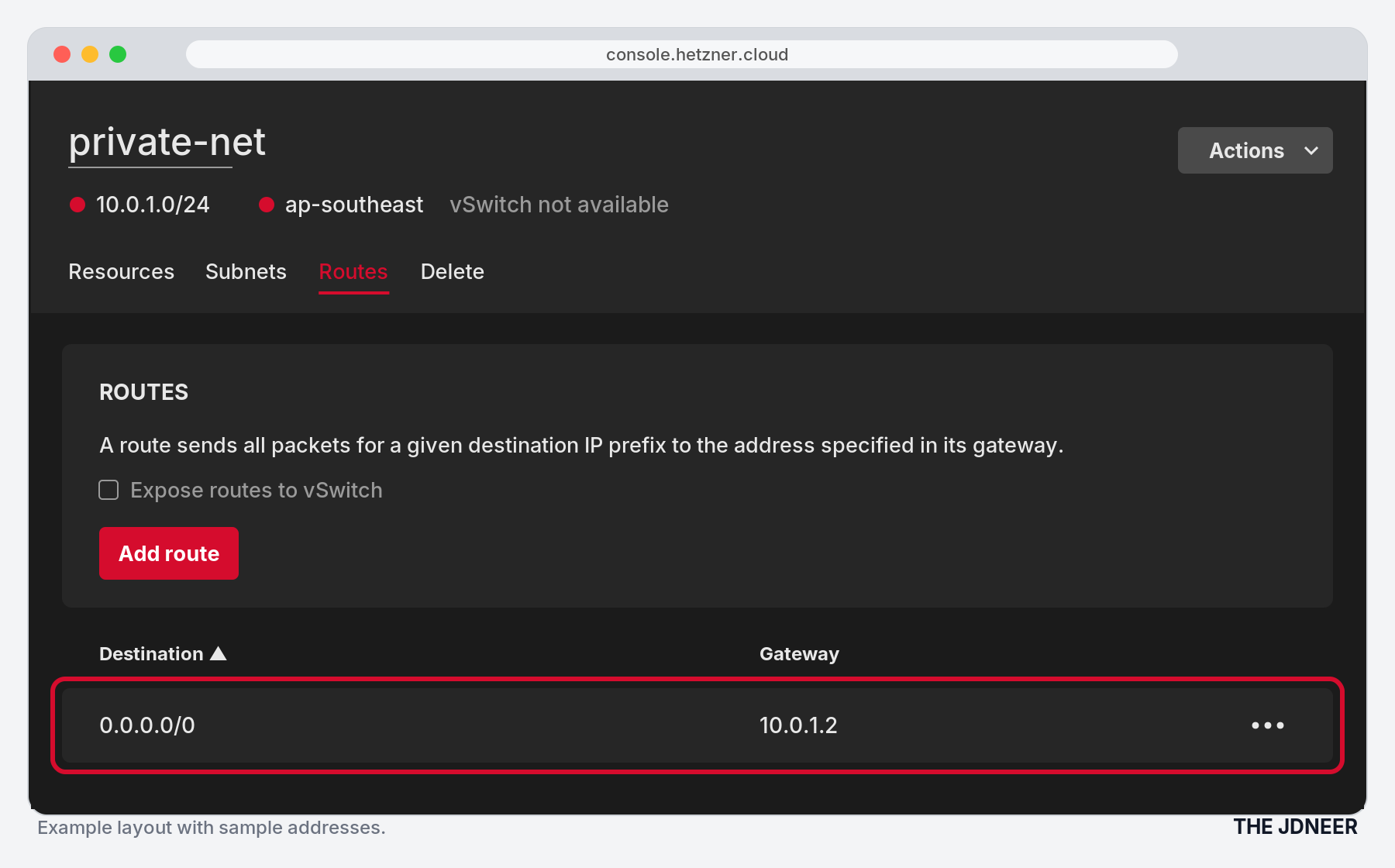
Under the network's Routes tab, add a route with destination 0.0.0.0/0 and gateway 10.0.1.2, the firewall's private IP. This tells the Hetzner network gateway to hand all traffic for outside addresses to the firewall. Per the Networks FAQ, only cloud servers can be route gateways.
4. Set up the firewall
The firewall keeps its normal default route on the public interface. It needs three things: IP forwarding, masquerade NAT for 10.0.1.0/24 out of its public interface, and a DNS resolver on 10.0.1.2 for the clients. MikroTik RouterOS (CHR) or VyOS come with all of that on board.
Return traffic needs no extra route, because servers in the network already reach 10.0.1.0/24 through 10.0.1.1.
5. Set up the clients
The private servers get a static address on the private interface, as Hetzner's server configuration guide documents for manual setups: the server's own IP as a /32, and a default route via the network gateway 10.0.1.1. Use exactly the IP the Console shows for each server. For DNS I point the clients at the firewall, 10.0.1.2.
On Rocky Linux 8 (Server A), first deal with hc-utils. Hetzner's images configure private interfaces through hc-utils, which runs its own hc-net-ifup@.service DHCP client per interface. Left in place, it fights your static config, and Hetzner warns this causes outages. Remove the package:
[root@server-a ~]# dnf remove hc-utilsThen create /etc/sysconfig/network-scripts/ifcfg-enp7s0:
[root@server-a ~]# cat /etc/sysconfig/network-scripts/ifcfg-enp7s0
TYPE=Ethernet
BOOTPROTO=none
DEVICE=enp7s0
ONBOOT=yes
IPADDR=10.0.1.3
PREFIX=32
DEFROUTE=yes
DNS1=10.0.1.2
And /etc/sysconfig/network-scripts/route-enp7s0. The first line makes the gateway reachable on-link, the same way Hetzner's doc does it, and the second sends everything else through it:
[root@server-a ~]# cat /etc/sysconfig/network-scripts/route-enp7s0
10.0.1.1/32 via 0.0.0.0 dev enp7s0 scope link
default via 10.0.1.1 dev enp7s0
[root@server-a ~]# nmcli con reload
[root@server-a ~]# nmcli con up "System enp7s0"On Ubuntu (Server B), check whether hc-utils is installed too. Its Debian package ships the same rule that starts dhclient on the private interface, which would fight the static netplan config below. If it shows up, remove it:
root@server-b:~# dpkg -l hc-utils
root@server-b:~# apt purge hc-utils
Then I use /etc/netplan/60-private.yaml, following Hetzner's static netplan example with a default route instead of the network range:
root@server-b:~# cat /etc/netplan/60-private.yaml
network:
  version: 2
  renderer: networkd
  ethernets:
    enp7s0:
      addresses:
        - 10.0.1.10/32
      routes:
        - to: default
          via: 10.0.1.1
          on-link: true
      nameservers:
        addresses: [10.0.1.2]
root@server-b:~# netplan generate
root@server-b:~# netplan apply6. Verify it worked
Check the address and routes first:
[root@server-a ~]# ip -4 addr show enp7s0   # expect 10.0.1.3/32
[root@server-a ~]# ip route                 # expect default via 10.0.1.1
Then test each hop. The output below is a sample from my setup, so your addresses and times will differ. First, the firewall reaches Server A over the private network:
root@fw1:~# ping -c4 -i .5 10.0.1.3
PING 10.0.1.3 (10.0.1.3) 56(84) bytes of data.
64 bytes from 10.0.1.3: icmp_seq=1 ttl=64 time=0.612 ms
64 bytes from 10.0.1.3: icmp_seq=2 ttl=64 time=0.489 ms
64 bytes from 10.0.1.3: icmp_seq=3 ttl=64 time=0.501 ms
64 bytes from 10.0.1.3: icmp_seq=4 ttl=64 time=0.477 ms
Server A reaches the firewall:
[root@server-a ~]# ping -c4 -i .5 10.0.1.2
PING 10.0.1.2 (10.0.1.2) 56(84) bytes of data.
64 bytes from 10.0.1.2: icmp_seq=1 ttl=64 time=0.598 ms
64 bytes from 10.0.1.2: icmp_seq=2 ttl=64 time=0.455 ms
64 bytes from 10.0.1.2: icmp_seq=3 ttl=64 time=0.470 ms
64 bytes from 10.0.1.2: icmp_seq=4 ttl=64 time=0.462 ms
Server A goes outbound. This only works if the firewall NAT is doing its job:
[root@server-a ~]# ping -c4 -i .5 1.1.1.1
PING 1.1.1.1 (1.1.1.1) 56(84) bytes of data.
64 bytes from 1.1.1.1: icmp_seq=1 ttl=57 time=27.1 ms
64 bytes from 1.1.1.1: icmp_seq=2 ttl=57 time=27.1 ms
64 bytes from 1.1.1.1: icmp_seq=3 ttl=57 time=27.4 ms
64 bytes from 1.1.1.1: icmp_seq=4 ttl=57 time=27.6 ms
Server A resolves names through the firewall, then pings by name:
[root@server-a ~]# dig +short jdneer.com @10.0.1.2
5.223.46.104
[root@server-a ~]# ping -c4 -i .5 jdneer.com
PING jdneer.com (5.223.46.104) 56(84) bytes of data.
64 bytes from jdneer.com (5.223.46.104): icmp_seq=1 ttl=62 time=70.4 ms
64 bytes from jdneer.com (5.223.46.104): icmp_seq=2 ttl=62 time=69.8 ms
64 bytes from jdneer.com (5.223.46.104): icmp_seq=3 ttl=62 time=70.1 ms
64 bytes from jdneer.com (5.223.46.104): icmp_seq=4 ttl=62 time=69.9 msThen do the real test: reboot the firewall and Server A, and run the same checks without touching anything.